
Stop Paying for Music: How to Score Your Videos with AI
Finding the right background music for a video used to mean one of two things: paying a composer or risking a copyright strike. Musick AI changes that equation entirely. As a dedicated AI Music Generator, it lets anyone produce original, royalty-free tracks in minutes — no music theory required, no licensing headaches.
I. Why Video Creators Struggle with Music
Music can make or break a video. A well-matched track lifts the mood, keeps viewers watching longer, and makes content feel polished. But finding that track has always been expensive or complicated.
Hiring a composer means waiting days or weeks for a finished piece, then negotiating rights. Stock music libraries often come with usage restrictions — some tracks are cleared for YouTube but not for commercial projects. And free music platforms frequently bury royalty-free tracks under confusing attribution rules.
The result? Many creators either settle for generic loops or spend hours searching for something that fits. Neither option is a good use of time.
II. What Musick AI Actually Does
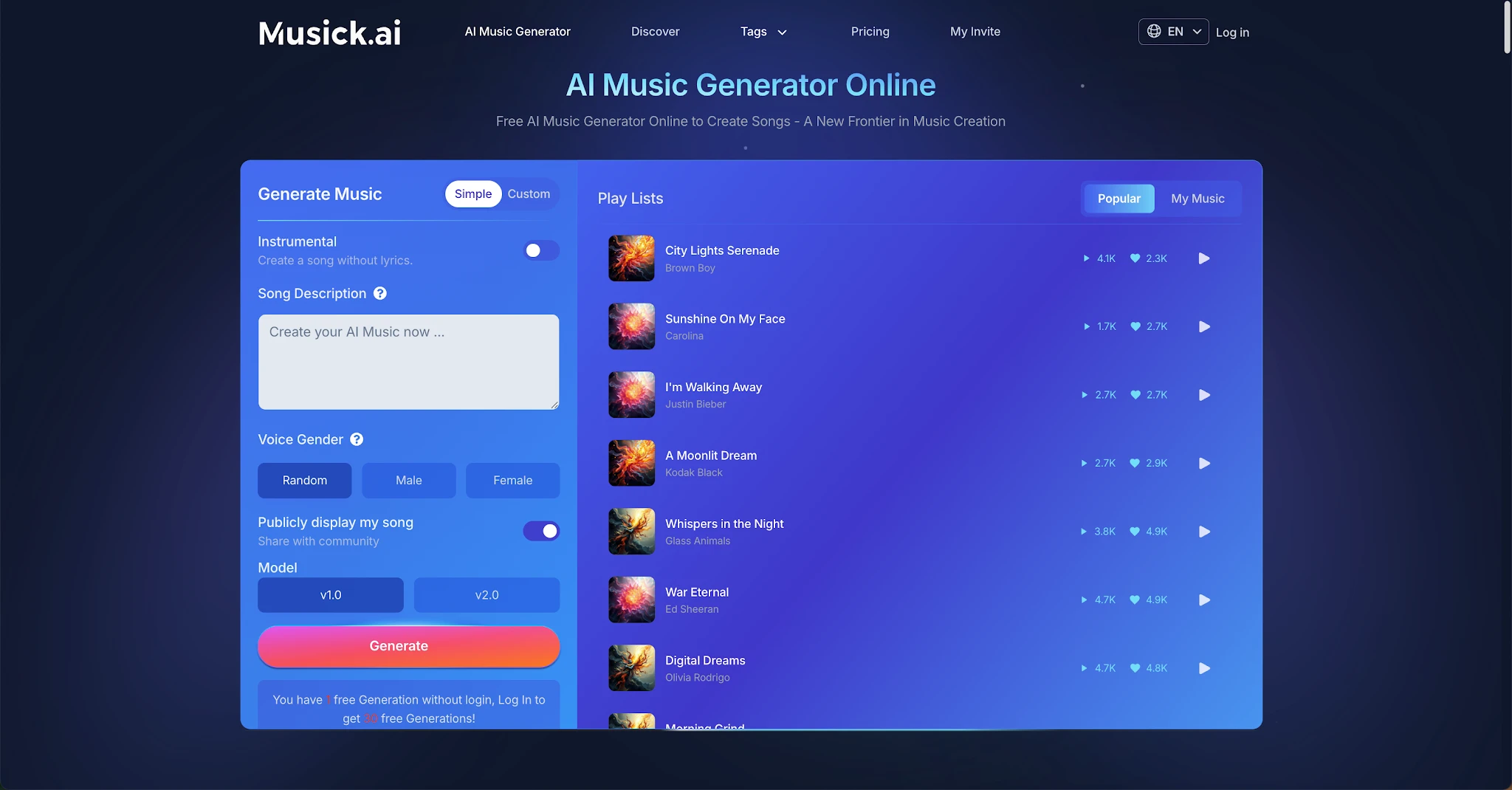
Musick AI is an online music generation tool that creates full songs and instrumentals from a simple text prompt. Describe what you want — the genre, the vibe, the mood — and the tool builds a track around that description.
The process takes seconds. There's no music knowledge needed, no software to install, and no waiting. The tool handles composition, arrangement, and production entirely on its own.
Every track generated on Musick AI comes with a commercial license, making the music safe for use across YouTube, Instagram, Facebook, TikTok, LinkedIn, and other content channels.
III. Genres and Creative Range
One of the most practical things about Musick AI is how many musical styles it supports. The platform covers:
-
EDM — driving electronic builds and drops
-
R&B — smooth, groove-focused tracks
-
Hip-Hop — beat-heavy, rhythmic compositions
-
Pop — bright, melodic arrangements
-
Jazz — laid-back or sophisticated instrumentals
-
Classical — orchestral and piano-driven pieces
-
Rock and Roll, Metal, Blues, Reggae, Disco, Country, K-Pop, Saxophone
This range means creators across different content types — travel vlogs, cooking channels, product demos, podcasts — can find a style that actually fits their content rather than defaulting to a one-size-fits-all loop.
IV. Key Tools Beyond Basic Music Generation
Musick AI includes several specialized tools that go beyond generating a background track:
AI Song Lyrics Generator
Input a genre or theme, and the tool writes lyrics to match. Useful for creators who want a song with words, not just an instrumental.
AI Beat Producer
Enter melody notes directly and the AI builds a beat around them. This gives musicians more control over the rhythmic foundation of a track.
AI Rap Generator
Design a music sheet or playlist, select a genre, and generate rap-style compositions. This suits creators in content areas like gaming, streetwear, or sports.
Vocal Customization
When generating a song with vocals, users can choose the vocalist's gender, giving the final track a more intentional sound.
Instrumental Mode
For creators who need pure background music without any singing, the instrumental toggle generates lyric-free tracks ideal for video scoring.
V. How to Generate a Track
The process on Musick AI is straightforward:
-
Write a prompt — Describe the style and topic. For example: "acoustic pop about the holidays" or "uplifting energetic summer track with bright synths and 120 BPM."
-
Choose vocal preferences — Select whether the track should have a male or female vocalist, or opt for instrumental only.
-
Select a model — The platform offers model options to adjust generation behavior.
-
Generate — The AI produces the track within seconds.
-
Download — Tracks can be downloaded as MP3 files for immediate use in video projects.
The more specific the prompt, the more tailored the result. Mentioning genres, moods, instruments, and tempo gives the AI music engine clearer direction and tends to produce better-matched output.
VI. Who This Is Most Useful For
Musick AI was built with a broad range of use cases in mind, and these are the types of creators who benefit most:
-
YouTubers and vloggers who need consistent background music across multiple uploads
-
Short-form content creators on Instagram Reels or TikTok who want tracks that match the energy of their clips
-
Educators and teachers producing instructional videos or high school musical content
-
Filmmakers and video editors scoring scenes without a composer budget
-
Podcast producers looking for intro and outro music
-
Game developers who need looping background compositions
-
Business teams creating product demos, explainers, or social ads
The AI Song Maker functionality also means the output isn't just a loop — it can be a structured piece with intro, verse, chorus, bridge, and outro, giving videos a more dynamic audio backdrop.
VII. Copyright, Consent, and Commercial Use
Copyright is the most important practical question for any creator using AI-generated music. Musick AI addresses this directly: its music library is created with full consent and strict adherence to copyright laws.
This means the intellectual property of the original artists who informed the model's training is protected. Creators using Musick AI tracks don't need to worry about DMCA takedowns on YouTube or licensing audits on commercial platforms.
All generated tracks come with a commercial license. Whether the content is monetized on YouTube, used in a paid advertisement, or included in a product video, the music is cleared for those uses.
For any creator who has experienced the frustration of a video being muted or demonetized due to a music claim, this is the most meaningful feature of the whole tool. The AI Music Maker approach here isn't just about convenience — it's about actually solving a real problem that affects creators every time they publish.


